Studying Python release adoptions by looking at PyPI downloads
- Python 97.9%
- Shell 2.1%
| Filename | Latest commit message | Latest commit date |
|---|---|---|
| bump.sh | ||
| pypi-download-counts-daily-log.png | ||
| pypi-download-counts-daily.png | ||
| pypi-download-counts-log.png | ||
| pypi-download-counts.png | ||
| pyproject.toml | ||
| python-versions-lines-daily.png | ||
| python-versions-lines.png | ||
| python-versions-stacked-daily.png | ||
| python-versions-stacked.png | ||
| python-versions.sqlite | ||
| python_versions.py | ||
| README.md | ||
| requirements.txt | ||


Analysis of version adoptions on PyPI
⚠ This project has an issue : it relied on free access to Google Big Query but with the qty of downloads rising, a free access is no longer enough, so I bet the data will just become sparse.
TLDR as of 2026-09
| 3.14 | 3.13 | 3.12 | 3.11 | 3.10 | 3.9 | 3.8 | 3.7 | Other |
|---|---|---|---|---|---|---|---|---|
| 7.86% | 14.86% | 33.83% | 17.74% | 11.87% | 6.51% | 1.23% | 1.51% | 4.39% |
pypi.org downloads by version
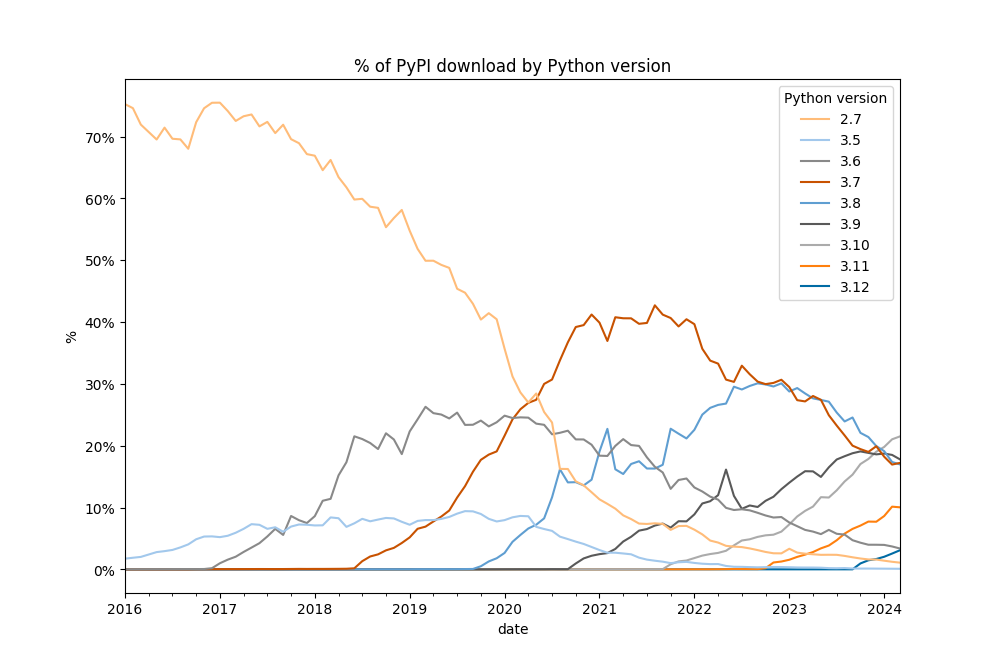

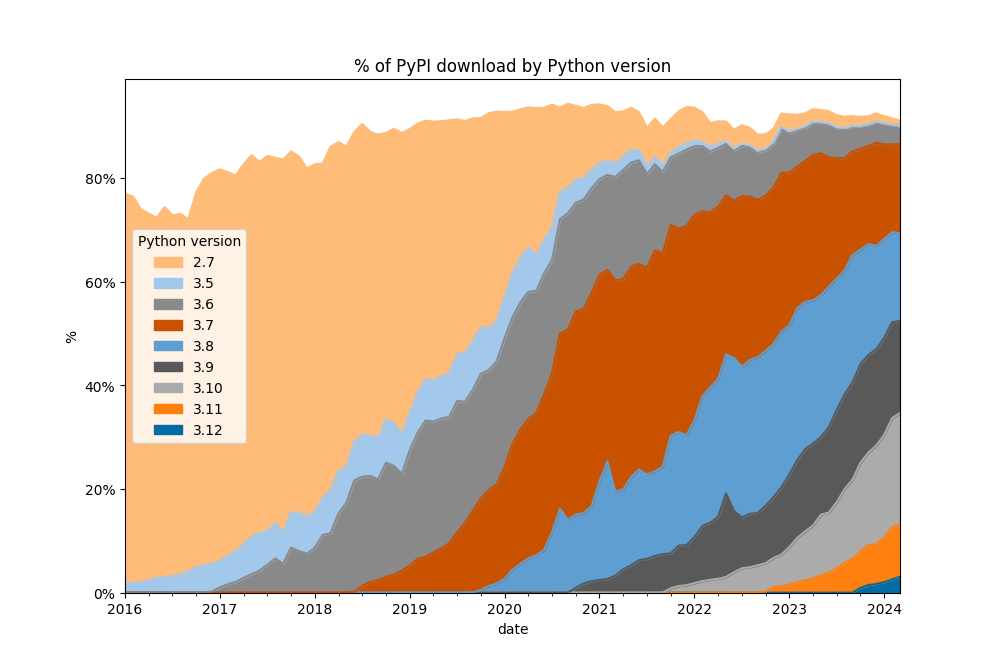

Tables
Monthly
| date | 3.14 | 3.13 | 3.12 | 3.11 | 3.10 | 3.9 | 3.8 | 3.7 | Other |
|---|---|---|---|---|---|---|---|---|---|
| 2024-07 | 0.00% | 0.00% | 6.02% | 14.10% | 23.89% | 17.83% | 14.71% | 12.19% | 7.29% |
| 2024-08 | 0.00% | 0.00% | 6.44% | 15.84% | 23.21% | 16.97% | 14.64% | 11.61% | 6.62% |
| 2024-09 | 0.00% | 0.03% | 7.44% | 19.45% | 22.70% | 14.69% | 14.35% | 10.93% | 5.84% |
| 2024-10 | 0.00% | 0.75% | 7.70% | 19.27% | 23.22% | 14.81% | 11.69% | 11.75% | 6.71% |
| 2024-11 | 0.00% | 1.05% | 7.58% | 23.97% | 22.70% | 15.80% | 10.18% | 10.96% | 5.77% |
| 2024-12 | 0.00% | 1.42% | 8.76% | 16.68% | 24.22% | 19.87% | 9.81% | 11.44% | 5.86% |
| 2025-01 | 0.00% | 1.88% | 10.47% | 18.86% | 23.98% | 17.84% | 8.88% | 10.34% | 6.31% |
| 2025-02 | 0.00% | 2.78% | 10.97% | 21.85% | 23.74% | 15.50% | 8.46% | 9.10% | 6.39% |
| 2025-03 | 0.00% | 3.43% | 11.62% | 22.77% | 23.46% | 15.61% | 7.24% | 8.55% | 6.26% |
| 2025-04 | 0.00% | 6.39% | 12.56% | 21.97% | 22.89% | 16.37% | 6.21% | 7.30% | 5.42% |
| 2025-06 | 0.00% | 4.40% | 15.23% | 22.57% | 21.62% | 17.61% | 5.80% | 6.47% | 5.50% |
| 2025-07 | 0.00% | 4.79% | 14.67% | 31.03% | 20.65% | 12.67% | 4.75% | 5.80% | 4.97% |
| 2025-08 | 0.00% | 6.18% | 17.59% | 23.41% | 23.64% | 11.80% | 4.68% | 6.16% | 5.87% |
| 2025-09 | 0.00% | 7.00% | 18.61% | 24.03% | 24.16% | 10.62% | 4.45% | 5.40% | 5.05% |
| 2025-10 | 0.52% | 8.68% | 20.34% | 24.89% | 22.20% | 9.86% | 4.09% | 4.68% | 4.26% |
| 2025-11 | 1.28% | 7.84% | 21.20% | 24.98% | 22.10% | 9.33% | 3.78% | 4.96% | 4.21% |
| 2025-12 | 1.63% | 8.75% | 21.74% | 24.50% | 22.01% | 8.94% | 3.50% | 4.50% | 4.11% |
| 2026-01 | 1.94% | 8.95% | 23.70% | 24.36% | 20.99% | 8.31% | 3.40% | 4.07% | 3.96% |
| 2026-02 | 2.59% | 11.16% | 25.49% | 23.40% | 19.36% | 7.17% | 2.98% | 3.31% | 4.30% |
| 2026-03 | 3.18% | 12.43% | 26.84% | 22.19% | 19.27% | 6.63% | 2.54% | 2.72% | 3.96% |
| 2026-04 | 3.94% | 11.26% | 28.26% | 22.21% | 19.53% | 6.44% | 2.18% | 2.48% | 3.50% |
| 2026-05 | 4.99% | 11.28% | 30.18% | 21.60% | 18.29% | 6.27% | 2.01% | 2.25% | 2.96% |
| 2026-06 | 5.91% | 14.62% | 30.25% | 20.46% | 16.31% | 5.33% | 1.92% | 1.76% | 3.27% |
| 2026-07 | 6.83% | 14.70% | 32.63% | 20.28% | 13.52% | 5.30% | 1.53% | 1.75% | 3.35% |
| 2026-08 | 6.84% | 14.46% | 33.21% | 19.80% | 13.79% | 5.54% | 1.32% | 1.54% | 3.39% |
| 2026-09 | 7.86% | 14.86% | 33.83% | 17.74% | 11.87% | 6.51% | 1.23% | 1.51% | 4.39% |
Daily
| date | 3.14 | 3.13 | 3.12 | 3.11 | 3.10 | 3.9 | 3.8 | 3.7 | Other |
|---|---|---|---|---|---|---|---|---|---|
| 2026-08-24 | 7.50% | 14.38% | 34.15% | 20.51% | 11.69% | 5.30% | 1.22% | 1.45% | 3.68% |
| 2026-08-25 | 7.42% | 15.10% | 32.49% | 18.44% | 11.90% | 6.68% | 1.32% | 1.65% | 4.86% |
| 2026-08-26 | 7.44% | 15.32% | 32.84% | 18.24% | 11.76% | 6.61% | 1.34% | 1.58% | 4.71% |
| 2026-08-27 | 7.83% | 15.38% | 32.93% | 18.48% | 11.31% | 6.13% | 1.43% | 1.54% | 4.77% |
| 2026-08-28 | 7.22% | 14.85% | 33.07% | 18.18% | 12.08% | 6.55% | 1.55% | 1.57% | 4.73% |
| 2026-08-29 | 6.29% | 12.09% | 32.85% | 17.79% | 14.60% | 8.54% | 1.78% | 2.11% | 3.69% |
| 2026-08-30 | 6.48% | 12.38% | 31.63% | 18.23% | 14.83% | 8.92% | 1.69% | 2.06% | 3.57% |
| 2026-08-31 | 7.93% | 14.20% | 31.99% | 18.59% | 13.00% | 6.56% | 1.44% | 1.50% | 4.58% |
| 2026-09-01 | 7.96% | 14.60% | 32.60% | 18.00% | 12.96% | 6.16% | 1.37% | 1.47% | 4.69% |
| 2026-09-02 | 8.03% | 15.04% | 32.84% | 17.84% | 12.48% | 6.11% | 1.28% | 1.39% | 4.80% |
| 2026-09-03 | 7.85% | 14.95% | 33.97% | 17.51% | 12.02% | 6.23% | 1.22% | 1.36% | 4.72% |
| 2026-09-04 | 7.86% | 14.87% | 33.73% | 17.28% | 12.56% | 6.42% | 1.32% | 1.45% | 4.29% |
| 2026-09-05 | 6.40% | 13.00% | 32.37% | 17.80% | 14.77% | 8.34% | 1.59% | 1.88% | 3.52% |
| 2026-09-06 | 6.08% | 12.14% | 32.59% | 18.67% | 14.35% | 8.06% | 1.51% | 1.84% | 4.45% |
| 2026-09-07 | 7.67% | 13.99% | 32.75% | 18.76% | 12.11% | 6.55% | 1.39% | 1.54% | 5.04% |
| 2026-09-08 | 8.16% | 15.04% | 34.02% | 18.01% | 11.08% | 6.02% | 1.31% | 1.43% | 4.73% |
| 2026-09-09 | 8.31% | 15.33% | 33.86% | 17.86% | 11.12% | 5.98% | 1.19% | 1.43% | 4.74% |
| 2026-09-10 | 8.22% | 15.27% | 33.71% | 17.72% | 11.88% | 6.03% | 1.06% | 1.41% | 4.51% |
| 2026-09-11 | 8.11% | 15.44% | 33.38% | 17.80% | 11.90% | 6.31% | 1.08% | 1.50% | 4.29% |
| 2026-09-12 | 6.41% | 13.53% | 32.88% | 18.45% | 13.48% | 8.52% | 1.32% | 2.06% | 3.13% |
| 2026-09-13 | 6.51% | 13.23% | 33.90% | 18.05% | 12.98% | 8.72% | 1.39% | 2.12% | 2.89% |
| 2026-09-14 | 8.46% | 15.33% | 33.57% | 18.09% | 11.11% | 6.28% | 1.11% | 1.40% | 4.47% |
| 2026-09-15 | 8.43% | 15.37% | 34.25% | 17.24% | 11.42% | 6.08% | 1.12% | 1.42% | 4.49% |
| 2026-09-16 | 8.54% | 15.52% | 35.24% | 17.34% | 10.27% | 6.01% | 1.14% | 1.38% | 4.38% |
| 2026-09-17 | 8.13% | 15.70% | 35.88% | 17.02% | 10.04% | 6.11% | 1.07% | 1.43% | 4.42% |
| 2026-09-18 | 7.83% | 16.04% | 35.94% | 16.76% | 10.45% | 6.28% | 1.10% | 1.42% | 3.99% |
Where does the data come from?
We get publicly available PyPI download statistics on Google BigQuery using pypinfo.
Here is the repo for the open-source code pushing the pypi stats to BigQuery.
Usage
First you need to get an access to PyPI's BigQuery, by following pypinfo procedure.
Then there's two main invocations, first fetch the data using:
python python_versions.py --fetch
Then plot it using:
python python_versions.py --plot
Get tables using:
python python_versions.py --table
How to contribute to this repo
- Create a Google Account (yep, sorry)
- Go to https://console.developers.google.com/cloud-resource-manager
- Click « Create a project », create the project.
- Go to https://console.cloud.google.com/apis/dashboard, activate BigQuery if not already activated.
- Create credentials, check "Application data".
- Fill account details and press button "Create and Continue".
- Select role "Big Query User".
- Go to https://console.cloud.google.com/apis/credentials, click on your service account, navigate to the "Keys" tab.
- Click "Add a new key", JSON, create, it'll download a json file.
- Run python python_versions.py --auth path_to_the_downloaded_json --fetch